

GAULT STORM CENTER: Your go-to resource before, during, and after a storm
Save this page! In the event of a storm, check back here for the latest updates and notices regarding delivery and service.

Storm Update

Propane Resources


Generator Resources
How To Videos
STORM UPDATES
This section will host up-to-date storm information before, during, and after a storm. You will find easy buttons to request a propane delivery, generator service, and to let us know when your power has been restored!

PROPANE RESOURCES
-
During a power outage, if you use a propane powered generator, we will ask for specific pieces of information when you request a delivery in order to determine your run rate, aka how fast you are consuming propane.
Knowing the KW of your generator, propane tank size and an accurate percentage of propane in your tank will allow us to calculate your run rate* and determine how many hours until a delivery is required.
*We build buffers into our calculation in order to ensure you receive a delivery in advance of when it is needed.
-
Locate the propane tank on your property (it is important to know which tank fuels your generator)
Lift the cover on the top of the tank
The gauge reads as a percentage of volume you have in your tank - 80% is considered a full tank
-
Lift the cover on the top of the propane tank that fuels your generator
Locate the gauge on the top of the tank
The gauge reads as a percentage of volume you have in your tank - 80% is considered a full tank
-
Propane is stored as a liquid under pressure in your tank. Propane liquid, like water, will expand when heat is added to it.* Tanks are filled to 80% of their capacity to account for the effects of pressure and temperature. This 20% buffer allows for the propane to expand freely as temperatures change throughout the day without danger of the tank becoming over pressurized.
*Fun fact: propane liquid expands in volume nearly 17 times greater than water when exposed to the same temperature increase.
-
In the event that you smell gas or in an emergency, it may be necessary to turn your propane tank off. To turn the tank off…
Locate the propane tank on your property
Lift the top cover on the tank
Locate the valve on the top of the tank (click here to see where the valve is located)
Turn the valve clockwise until you cannot turn it anymore
When you cannot turn the valve any further, you have shut the propane supply off to your home.
VIDEO: HOW TO CHECK THE LEVEL OF PROPANE IN MY TANK
SWITCH TO GAULT
We understand that times are rough during a big storm. If you’d like to switch your propane to Gault and start receiving propane deliveries, please click the button below to provide the information we need to make your switch to Gault. A member of our team will be in touch shortly.
GENERATOR RESOURCES
-
If your generator runs consecutively for 48 hours or more during a power outage, it is important to turn your generator off and check the level of oil every 24 hours in order to ensure peak efficiency through the duration of the storm.
See instructions below on how to turn the unit off and check/add oil!
-
Lift the top cover of the unit
Locate the Manual/Auto/Off control on the right side of the unit
Select OFF on the keypad
Press ENTER on the keypad
-
If your generator runs consecutively for 48 hours or more during a power outage, it is important to turn your generator off and check the level of oil every 24 hours in order to ensure peak efficiency through the duration of the storm.
Lift the top cover of the unit
Locate the Manual/Auto/Off control on the right side of the unit
Select OFF on the keypad
Press ENTER on the keypad
Remove the front cover by lifting it up and then out
Locate the oil dipstick and remove it. Check that the oil is at the proper level on the stick
If oil needs to be added, remove the oil cap and insert a funnel
If your generator is serviced by Gault, you must add Synthetic 5W-30 oil
Recheck the dipstick for proper oil level, then seal tightly
Replace the front cover on the unit
Select AUTO on the keypad
The generator should start within 10 seconds
-
If your generator is serviced by Gault, we use Synthetic 5W-30 oil in your generator. We suggest customers keep oil on hand in the event it needs to be added. Synthetic 5W-30 oil can be purchased at a car parts store or any major gas station like a Shell or Mobil.
-
In the event that the power goes out and your generator does not automatically run, it is important to know how to clear a fault code in order to start the generator.
GENERAC GENERATOR
Lift the top cover of the unit
Locate the control panel on the right side of the unit
Select OFF on the keypad
Press ENTER on the keypad to clear the fault code
Select AUTO, the generator should start within 10 seconds
If it does not start, start the generator manually by selecting MANUAL
When power is restored to your home, return to the generator and select AUTO on the control to restore it to automatic mode
KOHLER GENERATOR
Lift the top cover of the unit
Locate the control panel on the right side of the unit
Select OFF on the keypad (this clears the fault code)
Next, select AUTO, the generator should start after 3 seconds
If it does not start, start the generator manually by selecting MANUAL
When power is restored to your home, return to the generator and select AUTO on the control to restore it to automatic mode
VIDEO: HOW TO CHECK THE LEVEL OF OIL IN YOUR GENERATOR
where to find important information on your generator:
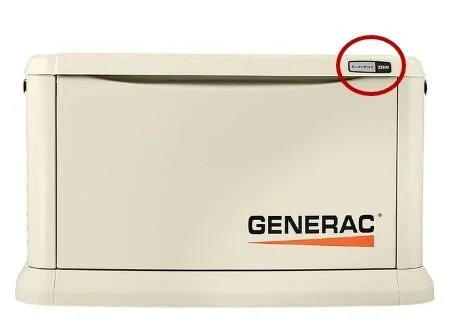
KW ON GENERAC
The KW of the generator is located on the front plaque as shown below:
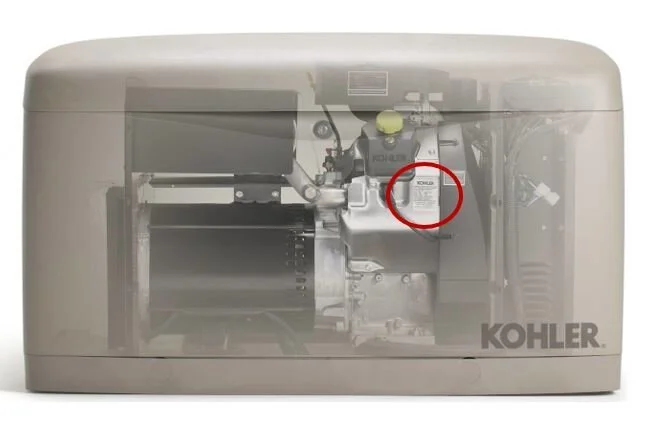
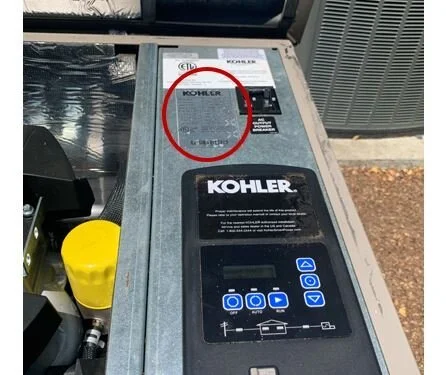
KW ON KOHLER
Lift the top cover. The KW is located on a sticker on the main panel located on the right side of the unit:
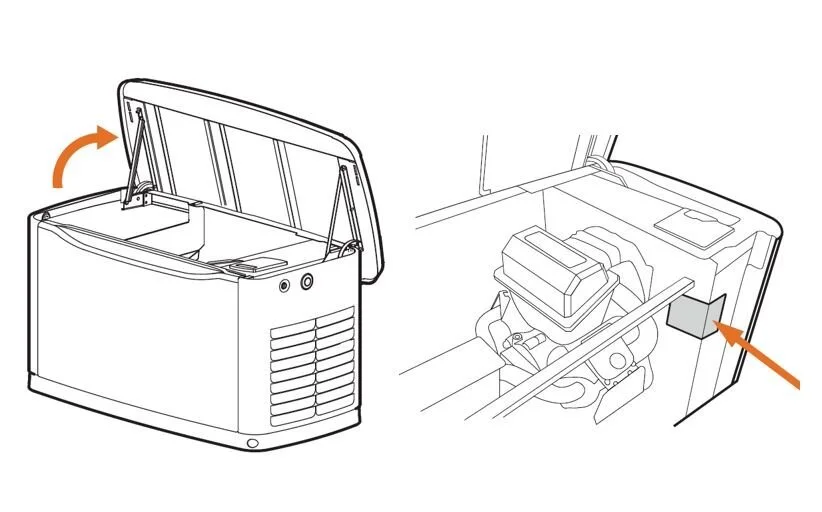
SERIAL NUMBER ON GENERAC
Lift the top cover. The serial number is located on a sticker to the right of the motor inside the unit as shown below:
SERIAL NUMBER ON KOHLER
Lift the top cover. The serial number is located on a sticker on the motor inside the unit as shown below:
Interested in a Generator?
An automatic standby generator will ensure that you'll never be left without power again. From servicing to sales and installations, we have expert generator technicians on hand.